iPhone 4S Shot of the Week: Brewed Coffee

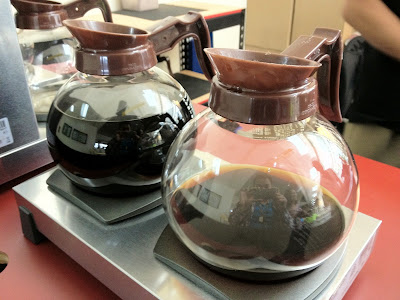
iPhone 4S shot of glass coffee pots using the HDR (High Dynamic Range) camera feature and Auto-Enhance photo editing tool.
iPhone 4S shot using the HDR (High Dynamic Range) camera feature and the Auto-Enhance photo editing tool.

What's your favorite coffee? This week's featured iPhone 4S shot is a couple of glass coffee pots. You can see my reflection on the glass surface of both pots. The photo was captured with the iPhone 4S HDR (High Dynamic Range) camera feature enabled and the resulting photo was applied with the Auto-Enhance photo editing tool. Both of these are built-in features of the iPhone 4S and they bring camera-phone photography to a whole a new level. The camera improvements in the iPhone 4S along with the built-in photo editing tools are two of its huge selling points. The iPhone 4S camera is probably the most powerful camera-in-a-phone in the market today.

How to Auto-Enhance Photos in iPhone 4S

One of the photo editing tools available in iPhone 4S is Auto-Enhance. This post-processing tool applies automatic adjustment on the brightness, contrast, and saturation (color) of captured photos. To enable Auto-Enhance, open a photo from the iPhone 4S Photos app, tap it once to bring out the top and bottom tool bars, and select Edit. Select the "magic wand" symbol from the bottom tool bar to apply Auto-Enhance, and hit Save. That's it, your photo should be enhanced instantly.
iPhone 4S shot with Auto-Enhance photo editing tool enabled.
The Auto-Enhance photo editing tool in iPhone 4S automatically fixes the brightness, contrast, and saturation of a photo.
iPhone 4S shot with Auto-Enhance photo editing tool disabled.
Washed-out raw iPhone 4S shot due to high natural brightness. This is the same (single) shot from above, only Auto-enhance is disabled in this photo.
When you apply Auto-Enhance, the "Auto-Enhance On" indicator appears on the lower left corner of the photo while on Edit. The cool thing about this feature is that you can undo or turn off the auto-enhancements anytime after you have applied it and even if you have already saved the edited photo. To turn off Auto-Enhance, just open the photo again, select Edit, and select the "magic wand" symbol. The "Auto-Enhance Off" indicator should appear on the now raw photo. The undo and redo of "Auto-Enhance" is limitless. You can apply and remove photo enhancements even when you have powered off , or reset your iPhone 4S. 

iPhone 4S Shot of the Week: Marc Ecko Lenox-Brigham Hi-Cut Shoes

iPhone 4S shot of a pair of Marc Ecko Cut & Sew Lenox-Brigham off white hi-cut shoes.
The iPhone 4S shot this week is processed with the Hudson photo filter in Instagram. The subject: Marc Ecko Cut & Sew Lenox-Brigham Hi-cut shoes.

The subject of the iPhone 4S shot this week is my new pair of Marc Ecko Cut & Sew Lenox-Brigham off white hi-cut shoes. I had the
photo uploaded at Instagram and processed with the Hudson filter. Instagram and iPhone 4S are made for each other. A great photo sharing app and a phone with an amazing 8 megapixel camera - really, what else can someone do but take shots all day?

Next week I plan to take a series of iPhone 4S shots outdoors. I don't think I've ever taken the iPhone 4S camera to a spin under sun. And now that I think about it, neither are these shoes. So "sun" + "camera" + "Marc Ecko Lenox-Brigham" = ? We'll see the answer next week.

iPhone 4S Shot of the Week: Sbarro's Chicago White Stuffed Pizza

This week's iPhone 4S shot is taken with the camera's HDR feature on. HDR or High Dynamic Range is a technique in photography that takes photos in several exposure levels in an attempt to produce a more natural looking photo, capturing the depth and brightness of the environment's natural lighting. While the qualities of what counts as an HDR photo may deserve a longer discussion in a different blog, in here what we know is that the iPhone 4S camera can perform HDR imaging with a simple toggle of a button. The subject of this week's iPhone 4S shot is Sbarro's Chicago White Stuffed Pizza.

iPhone 4S shot of Sbarro's Chicago White Stuffed Pizza.
iPhone 4S Shot of the Week: Sbarro's Chicago White Stuffed Pizza

In real life, Sbarro's Chicago White Stuffed Pizza is stuffed with mozzarella, pepperoni, ham, and ricotta cheese. This is essentially one of my favorite pizzas. I think the iPhone 4S camera, in all its 8 megapixel glory, did this food justice because the shot looks amazing. With the the iPhone 4S HDR camera feature on, this pizza looks just as heavenly as it tastes.

Fixing the iPhone 4S Camera Flash Issue

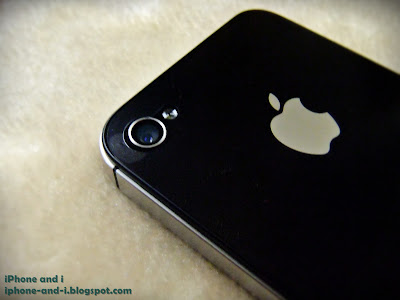
The back camera of iPhone 4S.
The iPhone 4S back camera is a powerful 8 megapixel camera with improved optics.

The iPhone 4S camera flash issue refers to the hazy and washed out photos resulting from turning the iPhone 4S camera flash on. Your iPhone 4S camera takes amazing photos until you turn the camera flash on and then you see a significant bleed through in the resulting photos characterized by that smoky, hazy quality.  The iPhone 4S camera flash issue is actually not an "iPhone 4S camera flash" issue. What's causing it is the iPhone case and/or that thin transparent film you use to protect the back of your iPhone 4S from scratching.  If you didn't remove the back plastic cover that comes with the brand new iPhone 4S, then that's also the reason why you're reading this article. The fix to the "iPhone 4S camera flash" issue is simple: there should be no obstruction to the back camera. Your protective case, or transparent back plastic must have an adequately sized hole for the back camera. Otherwise, the light from the flash bounces back from these obstructions and your camera will captures it, thus the hazy washed out quality (see sample shots below).

To avoid the iPhone 4S camera flash issue, use a protective case that does not obstruct the light from the flash of the back camera. Before buying a protective case, ask the store personnel if you can try it on. Once its on, take photos with your iPhone 4S camera flash on. If the resulting photos are not washed out, then you're good.
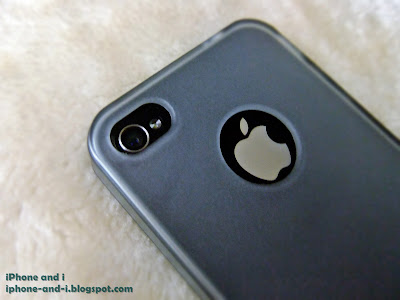
A protective case or jacket for iPhone 4S with sufficient hole for the back camera to avoid capture and flash obstruction.
iPhone 4S camera flash issue is caused by phone cases that obstruct the back camera.

iPhone 4S camera flash is turned on in taking the picture below but the original back plastic cover was not removed. The resulting photo has that hazy, washed out effect.

Hazy and washed out iPhone 4S shot with the camera flash enabled.
iPhone 4S camera flash issue sample shot. Notice the flash bleed  through. 

iPhone 4S camera flash is also turned on in taking the picture below but this time, there's no obstruction to the back camera. Notice the difference in photo quality.
Amazing iPhone 4S shot with the camera flash enabled.
iPhone 4S camera flash issue is fixed by removing back camera obstructions.

The iPhone 4S camera flash issue, according to some discussions on the Internet, is a design flaw. I personally don't think it is. Even if you use a regular point and shoot camera, if your finger obstructs the flash, you certainly won't end up with a usable photo. So in order to "fix" the iPhone 4S camera flash issue, don't use a protective case that will obstruct the back camera. That's it. Enjoy taking great pictures!

iPhone 4S Shot of the Week: Near-Empty Perfume Bottle

The iPhone 4S shot this week surprised me even though I'm the one who took it. This is the first photo I have ever taken with the iPhone 4S camera flash on. The subject is my near-empty perfume bottle - random, I know. I was never a fan of using camera flash even with point and shoot cameras because the resulting photos just sometimes look washed out. The photo below is a raw iPhone 4S camera shot. That's what an 8 megapixel and improved optics are all about.

An amazing iPhone 4S shot taken with the camera flash on.
iPhone 4S Shot of the Week: Near-Empty Perfume Bottle (taken with flash)

With this kind of photo, who needs a separate digital camera? If you wish to submit your own iPhone 4S shot, let me know in the comment section. I'd be more than happy to post your best iPhone 4S shot, and give due credits. The iPhone 4S camera is probably the best camera-on-a-phone in the market so go ahead and take it for a spin, or two.

iPhone 4S Shot of the Week: Happy New Year's!

The iPhone 4S shot this week is taken using the all new 8 megapixel camera. According to Apple's official iPhone 4S camera specification, the iPhone 4S camera does not only have 60 percent more megapixels than iPhone 4, it also has improved optics which allows better lighting through the lenses to produce the best quality shots (click sample photo below to zoom in).

An iPhone 4S shot showcasing the all new 8 megapixel camera.
An iPhone 4S 8 megapixel camera shot.

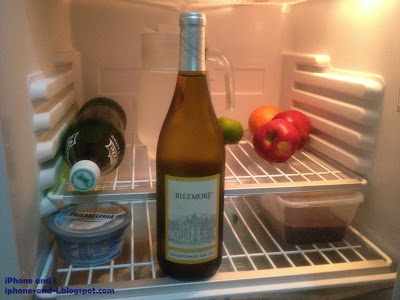
The iPhone 4S shot subject this week is my "New Year's Resolution": Keeping a clean fridge. And by the looks of it, I kinda have to agree with Apple. For a built-in camera, my empty fridge sure looks pretty good. If you wish to submit your own iPhone 4S shot, please indicate in the comments section. Happy New Year's!
Copyright 2011. All rights reserved.
artist photos