Best iPhone Apps 2012 : Find My iPhone

10 Awesome iPhone Apps You Can’t Get Anymore

Every once in a while, an app will show up in the iOS App Store that's not meant to be there, obviously in violation of one rule or another but overlooked by Apple's approval team. Here are 10 great iPhone apps that Apple banned from existence.

iTether, which enjoyed a few hours in the App Store this week, allowed the iPhone to become a portable modem, feeding Internet service to any laptop through a USB cable. For a one-time fee of $15, iTether was a steal compared to the $20 per month charged by AT&T and Verizon and the $30 per month charged by Sprint.
Violation: Carriers forbid unauthorized tethering in their terms of service, so iTether was never going to last.
Jailbreak Alternative: MiWi or PDANet should do the trick.

Via : JARED NEWMAN at techland.time.com

Download Redsn0w 0.9.10b5 to Fix iBook Issue

iPhone App of the Week: Tempe Run

Screen shots of Temple Run iPhone app.
Temple Run is a free iPhone (and iPad) app developed by Imangi Studios with full game controls and amazing upgrade features.

This week's iPhone app is
Temple Run, an endless treasure hunting game where the hero gets chased by monsters as he jumps over cliffs, slides under fire traps, and collects gold coins along narrow ancient trails. Developed by Imangi Studios, Temple Run is one of those free iPhone games that actually give you a lot of controls. Five controls, to be specific, in the free app version: swipe up to jump, swipe down to slide, swipe right to turn right, swipe left to turn left, and tilt iPhone left or right to collect coins. The tutorial is enabled  only during the first launch  of the app but it can be turned on again by going to the Main Menu > Options.

Temple Run free app version has 36 Objectives. These objectives start easy: Novice Runner, where yo have to run 500 meters without dying; Pocket Change, where you have to collect a total of 100 coins; and Adventurer, were you have to score 25,000 points - 100 points is earned every time the meter is filled full and the meter is filled incrementally each time you collect coins. The harder objectives are 5 Million Club, where you have to score 5,000,000 points; The Spartan, where you have to earn 1 Million points without using Powerups - Powerups are gears and cheats that you can buy from the Temple Run Store with the coins that you have collected; and the ultimate 10 Million Club, where you have to score 10,000,000 points.

Other stuffs you can buy from the Temple Run Store are Powerups: Invisibility, 250-m Boost, Double Value coins after 1500 meters; and Utilities: Resurrection, Boost 1000 meters at start of game, Mega Boost 2500 meters at start of game. You can even change your Character. You can select from: Guy Dangerous (default - spell Indiana Jones); Scarlett Fox, a cunning escape artist (also a redhead); Barry Bones, a city cop with an attitude; Karma Lee, the fastest legs in the Far East; Montana Smith, the second greatest explorer ever; Francisco Montoya, the conquistador, and Zack Wonder, the football star. All these characters can be unlocked with a corresponding price. You can even download Temple Run Wallpapers for 5,000 coins and it will be automatically saved in your Camera Roll album. A Stats is kept for your character which contains your Highest Score, Longest Run, and Most Coins records.

There are also several ways to die in Temple Run: if you jumped or fall on the waters, you'll be fed to the alligators; if you hit a rock; if you get burned by the fire traps; if you failed to dock and got your head cut off by an overgrown tree; and if you jumped short and fall down the cliff.

Temple Run hint: each time you hit on the walls of the trail, or almost miss a cliff, the monsters reappear to chase you. If you hit and almost miss again before the monsters disappear, they catch and eat you, and game over. I'm betting Temple Run will make it to the top iTunes Apps at the end of 2012. Download your free app now.

How to Back Up Contacts Using iCloud

The easiest way to back up contacts in iOS 5 devices is through iCloud. Using Apple's latest data-syncing and cloud storage service allows iPhone, iPod touch, and iPad users to manage and store contacts over the air. If you are connected over Wi-Fi or 3G then you can immediately start using iCloud to back up your contacts in 2 easy steps.

Step 1. On your Apple mobile device (e.g., iPhone 4S), go to Settings > iCloud and toggle Contacts "ON". The message prompt "Your contacts will be merged with iCloud" will appear. Select Merge.

iCloud Contacts settings in iPhone 4S.
Enabling iCloud Contacts will merge the contacts from all your other devices, producing a single common contacts list that is stored and pushed in and by iCloud. 

Step 2. Log in to
iCloud.com using your Apple ID and select the Contacts app icon. The contacts in your Apple mobile device should already start appearing. Compare the number of contacts in your device and that in the iCloud address book. Scroll or browse all the way down to see the "numbers of contacts" detail for both lists. If they're not matching, right-click on the contacts list page in iCloud and hit Refresh. When they are, then iCloud has finished syncing.

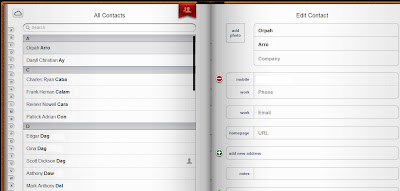
How to Back Up Contacts Using iCloud
The iCloud Contacts "address book" can be accessed by logging in at iCloud.com. Users can edit a contact detail and the changes will be reflected in all "iCloud Contacts"-enabled devices.

What happens next?
Remember that when you enable Contacts in iCloud, there will only be one "master" contacts list for the cloud and your Apple mobile device. If you have many devices, then this has to be configured separately for each. For example, if you want your iPhone 4S Contacts changes to be reflected in your iPad, then you have to enable iCloud Contacts in iPad (Step 1 above). When you do that, whatever changes in contacts you do in iPad (e.g., edit a contact number, add a new contact, add a profile picture) will also be reflected in iCloud, and in your iPhone 4S.

You only have one device?
If you only have one Apple mobile device, you can still use iCloud Contacts. You can log in to iCloud.com and whatever changes you make on the list here, will be reflected on your device. The same is true, the other way around.

You deleted a contact?
If you delete a contact, this will also be deleted not only in iCloud but in the rest of your Apple mobile devices. Remember: one common contacts list.

You restored your device and lost all your contacts?
If you restored your device and lost all your contacts, iCloud hasn't. Resetting an iPhone, iPod touch, or iPad, does not reset the iCloud account. So if you want your contacts back, simply toggle on Contacts in iCloud (Step 1) again, and the cloud will start pushing your contacts back to your newly restored device.

With iCloud, you won't need your iTunes and USB cable to back up your contacts. All you need is to toggle a button, and it will take care of the syncing, pushing, and storing for you. 

iPhone App of the Week: Snappers

This week's iPhone app is Snappers. A game developed by Mikhail Eliseev available for free downloads at the App Store. It is puzzle that involves popping colorful big-eyed creatures. You can't tell exactly what they are; they look like colorful bricks with huge eyes. How to play the game? Touch or hit the blue ones to make them orange, the orange ones to make them green, the green ones to make them red, and the red ones to make them pop! Only the red ones will pop so you have to make all other colors red (blue > orange > gree > red). The catch is, you have to be able to pop all creatures in the given number of taps. So if you have 3 taps available and you have 5 blues, 3 oranges, 8 greens, and 4 reds on screen, then you have to change non-red creatures to red and pop all red creatures in just 3 taps. Snappers is definitely addictive!

Screen shots of Snappers iPhone app.
Snappers is a fun game about popping colored big-eyed creatures in a given number of taps. Once you've popped all colors, you get to move to the next level.

Although Snappers iPhone app is free, you can purchase hints once you're stuck in one level. A message will pop-up offering you a hint. You have one free hint available, if you use that up you can purchase a hint for a dollar. I have never purchased a hint before, because it's more fun when you solve puzzles on your own. My friends and I would also pass around an iPhone and make a bet on who can conquer a difficult level. There are levels in Snappers where you have to pop all colors in just one tap! The person with least number of conquered levels takes care of lunch. So what are you waiting for? Go ahead,
download the free Snappers iPhone app today.

iPhone 4S Shot of the Week: Marc Ecko Lenox-Brigham Hi-Cut Shoes

iPhone 4S shot of a pair of Marc Ecko Cut & Sew Lenox-Brigham off white hi-cut shoes.
The iPhone 4S shot this week is processed with the Hudson photo filter in Instagram. The subject: Marc Ecko Cut & Sew Lenox-Brigham Hi-cut shoes.

The subject of the iPhone 4S shot this week is my new pair of Marc Ecko Cut & Sew Lenox-Brigham off white hi-cut shoes. I had the
photo uploaded at Instagram and processed with the Hudson filter. Instagram and iPhone 4S are made for each other. A great photo sharing app and a phone with an amazing 8 megapixel camera - really, what else can someone do but take shots all day?

Next week I plan to take a series of iPhone 4S shots outdoors. I don't think I've ever taken the iPhone 4S camera to a spin under sun. And now that I think about it, neither are these shoes. So "sun" + "camera" + "Marc Ecko Lenox-Brigham" = ? We'll see the answer next week.

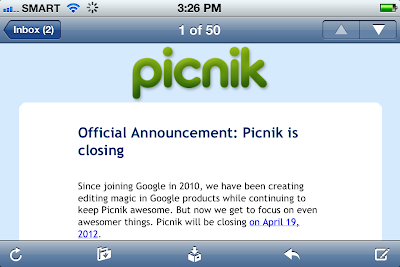
Picnik - The iPhone App that Never Was

Download Sn0wbreeze 2.9 to Jailbreak iOS 5.0.1


iH8Sn0w released Sn0wbreeze 2.9 to jailbreak iOs 5.0.1 untethered for iPhone 4, iPhone 3GS, iPad 1, iPod Touch 3G and iPod Touch 4G.

Because of Pod2G untethered jailbreak iOs 5.0.1 is possible, now all the Hacker team stage up by released their Jailbreak tool. iPhone Dev Team, Chronic Dev team already Released and now iH8Sn0w. Now iPhone 4S and iPad 2 Untethred jailbreak is waiting, it is possible very soon because it is already jailbroken by Pod2G.

Snowbreeze 2.9 Update :

- A5 devices are NOT supported at this time due to no public DFU/iBoot exploit.

- Supports iOS 3.1.3

- Supports iOS 3.2.x

- Supports iOS 4.0.x

- Supports iOS 4.1

- Supports iOS 4.2.1 – 4.2.8

- Supports iOS 4.3 – 4.3.3

- Supports iOS 5.0.1

- A rerelease fixed the IPSW download bug

Download Sn0wbreeze 2.9

How to Use the Built-in Dictionary App in iPhone 4S

The iPhone 4S built-in Dictionary app accessed by highlighting a word in a book page and selecting Define from the menu bar.
The iPhone 4S built-in Dictionary app can be accessed from a page in a book (actual book in the screen shot: The Memoirs of Sherlock Holmes by Sir Arthur Conan Doyle).

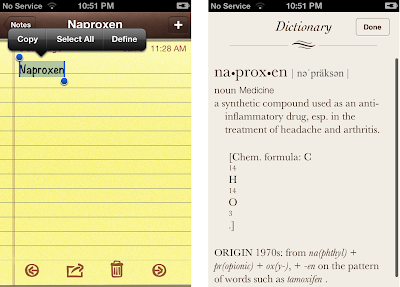
There is a built-in Dictionary app in iPhone 4S and the rest of the Apple mobile devices running on iOS 5. It does not have an app icon so you won't see this on your home screen. However, you can acess it whenever you want. To use the built-in dictionary app in iPhone 4S, you just double-tap a word to highlight it and select "Define" from the menu bar that appears. Automatically the dictionary app will display the definitions of the word, its derivatives, and the origin. This works for words you type in the Notes app, words you read in web pages, emails, and books. To close the app, select "Done" on the upper right corner of the Dictionary app page and your previous screen will reappear.

The iPhone 4S built-in Dictionary app used to define a word that is typed in the Notes app.
The iPhone 4S Dictionary app can be used to define a word by typing it in Notes.

The built-in Dictionary app is useful in writing emails, interpreting jargon, looking up word origins, and more. It functions just like a traditional dictionary except that most of the time you don't have to flip through pages or type a word in a search bar. The built-in Dictionary app works in offline mode. Amazing, eh?

iPhone App of the Week: Pulse News

Pulse News iPhone app gives you access to news from your favorite sources in a neatly organized panel. With Pulse News in your iPhone, you won't have to manually open websites of your favorite news sources in your one by one - it brings them all to you in one page.

Pulse News iPhone app screen shots.
The Pulse News iPhone App has customization tools so you can select and add your favorite news sources.

Pulse News iPhone app lets you customize your news by browsing through its existing news sources catalog, and touching the "add" button. All the news sources that you add can be seen in the app's Home page, which you can browse vertically (to see your complete news source choices) and horizontally (articles and updates from each news source). You can even add more pages so you can  organize news in categories. This app also lets you add a pre-filled page called a "pack" for news categories like Technology, News & Analysis, Business, Entertainment, and more. With Pulse News, you never have to miss your daily dose of news - plus it let's you do news reading in style.

iCloud Frequently Asked Questions

Apple's iCloud-Photo Stream promotional photo.
The iCloud - Photo Stream promotional slide at Apple's website.

I own an iPhone 4S. The iPhone 4S box has an iCloud logo on it. People ask how to iCloud this and that. What exactly is iCloud? This article will answer that, along with other frequently asked questions about the features and uses of iCloud, one of the greatest additions in Apple's latest firmware update, iOS 5.

So what is
iCloud?

The simple answer is iCloud is a "common storage service with a twist" for your Apple mobile devices using iOS 5. If you have an iPhone 4S and an iPad 2, iCloud will serve as a common storage for stuffs like music, photos, apps, books, and data purchased or generated using either devices. What's the twist? Your iPhone 4S does not have to fetch the iPad 2 stuffs from the common storage because they will be automatically pushed to your iPhone 4S. For example: If you take a photo using your iPhone 4S where Photo Stream is enabled, a copy will be uploaded to your iCloud account through Wi-Fi. And if your iPad 2 is connected to Wi-Fi and has Photo Stream enabled as well, then a copy of the photo will appear in your iPad 2. Even when you turn off your iPad 2 the copy will be there, stored and available for view, when you turn it back on. Think of it as a bypass to iTunes in your computer. You don't need to transfer your iPhone 4S Camera Roll photos to your computer just so you can sync them to your iPad 2 later. iCloud makes the whole process of sharing contents to your other Apple mobile devices faster and easier. The only requirement is that your iPhone 4S and iPad 2 have to be using the same iCloud account - that's why it's called "common" storage.

If I only have one Apple mobile device, then iCloud is not going to be very useful to me?

It is a storage. Why would a storage not be useful? The thing is, iCloud does not only distribute data to all your Apple mobile devices. Like most storage, it functions as a back up. It backs up your music, contacts list, emails, messages, and even settings. So, if even you don't have another Apple mobile device now, this backup will be available for pushing or syncing when the time comes that you do. If your iPhone 4S encounters some problems and needs reset, iCloud can push all your previous contents and settings back to your iPhone 4S so that you don't lose any data, and you can continue using your iPhone 4S as if you never reset it.

If I turn on iCloud, everything will be backed up, and pushed to my other devices? How do you turn it on?

iCloud is not a one-button-for-all service. You have to select what features you want to use. On your iPhone 4S, when you go to Settings > iCloud, you will see the list of apps or services that you can individually use. You can select Mail, Safari Bookmarks, and Photo Stream among others. If you don't want your documents and apps do be backed up and pushed then toggle Documents & Data off. If you don't want to push your photos, then toggle Photo Stream off. iCloud offers you the flexibility to choose only the services and functionality you need.

Is iCloud free?

Only for 5 GB data. If you're going to need more storage capacity then you can buy more storage. In your device select iCloud > Storage & Backup > Buy More Storage. The prices are 10 GB for $20/year (total of 15 GB with your 5 GB free), 20 GB for $40/year (25 GB total with your free 5GB storage), and 50GB for $100/year (55 GB total with your 5 GB free storage). You can check Apple's iCloud page for the details on how to renew lease every year.

What are other ways I can use iCloud?

There are tons of ways iCloud can make data sharing and syncing between your Apple mobile devices easy:
1. If you purchase a music from iTunes using one Apple mobile device, this can appear to your other mobile devices.
2. If you have pictures in your laptop that you sync to one of your Apple mobile devices, these can appear to all the others Apple mobile devices. These pictures could have been taken using whatever camera, or downloaded from the internet, it doesn't matter. As long they're synced on one iOS device, they can be pushed to all others.
3. If you download an app in one device, they will appear on all others.
4. If you have downloaded a book in one device and started reading it, and you decided to put a book mark, this book mark will be visible on a copy of that book on your other mobile device and you can finish reading right where you left off.
5. Calendar, Mails, Notes, Reminders, and Contacts list are always going to be identical between Apple mobile devices that have enabled these apps in iCloud. If your can't use one of your devices for some reason, your daily routine wont' have to disrupted because you can continue your normal business using your other devices. Call the same persons, read the same notes, different devices, same content.
6. You can locate your iPhone if you lost it using Find My iPhone service with iCloud.

iCloud is useful. I don't think anyone can say that it's just an attempt at making iOS 5 feature-rich because it's extremely functional. With iCloud, you are not only able to manage your contents but practically your daily life. You can get all these iCloud capabilities with iOS 5. And we all know iOS gets updated regularly. Imagine the possibilities.

iPhone App of the Week: Doodle Sprint!

The stick figure jumping over an obstacle in Doodle Sprint iPhone app.
iPhone App of the Week: Doodle Sprint! - an exciting game about running, rolling, and jumping over obstacles.
This week's iPhone app is Doodle Sprint! - a game right off the Top 25 free apps at the App Store today. Doodle Sprint! is a game where you make a stick figure run, roll, and jump over cliffs and obstacles. If you fall, you die. If you hit on an obstacle, you lose one of three lives. But if you catch a heart, you gain an extra life. This iPhone app is developed by Stewart Thompson, who apparently is just a student.

Screen shot of Doodle Sprint iPhone app New Game options showing Game Center Leaderboard and Achievements integration.
Doodle Sprint! has Game Center Leaderboard and Achievements features. 


Doodle Sprint! uses HD graphics, which looks amazing on your iPhone screen. If you have signed up at Game Center, Doodle Sprint! puts your user name and score in Leaderboards and Achievements along with other gamers playing with this app worldwide.  It also has Twitter and Facebook integration so you can brag about your top score with your friends. 

Doodle Sprint! is definitely a fun iPhone app that you can play when you're stranded at an airport, taking a break from work, or when you're just plain bored. Doodle Sprint! is an iPhone app rated for ages 9 above. 

Siri's Humor of the Week: When is Mark Zuckerberg getting married?

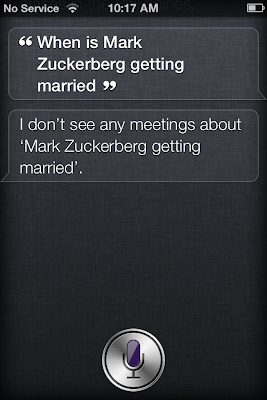
Siri answers a question about famous people.
Siri, the famous (and funny) virtual assistant in iPhone 4S, recognizes famous people. 

I asked Siri, "When is Mark Zuckerberg getting married?" I thought the answer was going to be, "You are not invited, Scott." Siri's humor can be triggered by just about any question that does not have anything to do with tasks available in your iPhone 4S.

Siri, the virtual assistant in iPhone 4S is handy, polite, and - the whole world knows - funny. Beginning today, I will be posting weekly screen shots of Siri's clever and humorous answers to my random questions. Enjoy!

iPhone App of the Week: NearMe

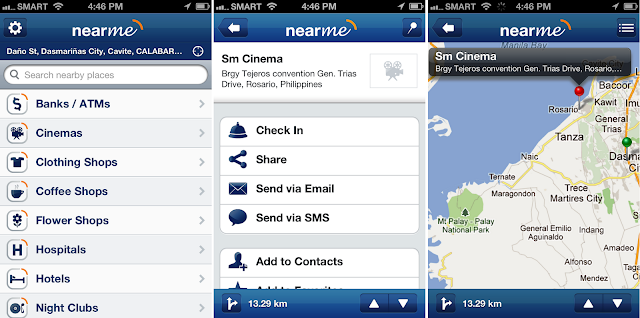
An iPhone app that can provide maps and directions to nearby local places hasn't lost any value among iPhone users even with the introduction of Siri because iPhone 4S's virtual assistant can only provide maps and directions within US. So if your looking for an iPhone app that can fill the gaps for Siri, especially when you're travelling overseas, which one do you use? The answer: NearMe

NearMe iPhone app maps, search panel, and search results directory.
NearMe iPhone app (version 1.2.3) panels are stylish and easy to use.

NearMe mobile guide app is developed by Yeerp Inc. for the range of Apple mobile devices: iPhone, iPod touch, and iPad. As of writing, this app is available for free download in the App Store. It connects to Wifi or 3G to identify your current location, and  look up for nearby local places. It then sorts resulting directories into several establishment categories like Banks/ATMs, Hotels, Parking, and Attractions; It also provides location distances, maps, and if available, establishment contact details. This app also allows you to choose between the Metric and English system, and share location information to friends via email, SMS, and "Check In" for social medias like Facebook and Four Square. Below are the details of my review for NearMe iPhone app (version 1.2.3).

The Good:


1. On start up, NearMe iPhone app displays your exact current location automatically - no unnecessary buttons.
2. The search bar is located right across the top and is wide enough for typing longer search keywords without losing  the earlier entered characters.
3. The establishment categories are well organized and spot on.
4. The drop pin button  shows both the pin for your current location, and that of your target destination in the map.
5. You can add places to Favorites and your searches are tacked in History for easy look up.

The current version of NearMe iPhone app could use improvements on these areas:

1. No landscape orientation - which means map view is restricted by iPhone or iPod touch portrait width; when your target destination is far from your current location, you have zoom out to get a view of both locations in the map.
2. No actual "directions" on the map. There is no solid link between your current location and the target destination in the map. You'll have to do a little bit of figuring out and decide which road or street to take.
3. No offline mode. The app should offer an option to save maps as photos in the phone for later look up; This is useful in cases when there's no available Wifi or 3G connection.

I have tried using the NearMe iPhone app in the city and it works perfectly. As long as you know how to figure out real life street signs and your NearMe iPhone app can connect to the internet, you're good to go.

White iPhone 4 Now Delayed Until "Later This Year"

As is reception issues, Bluetooth connection problems, and proximity sensor failures weren't enough, Apple has announced that elusive white iPhone 4 will be delayed even longer.

This is Apple's official statement:
White models of Apple's new iPhone 4 have continued to be more challenging to manufacture than we originally expected, and as a result they will not be available until later this year. The availability of the more popular iPhone 4 black models is not affected.
According to a report from 21st Century Business Herald, the company that produces the glass for the iPhone 4, Lens Technology, is having production problems with applying white paint to the glass. More specifically, the company is having problems with finding the right balance of paint thickness to allow clearance for the digitizers while at the same time adhering to the physical standards for "beauty" that Apple has for its products.

Apple's iPhone 4 retails for $199 (16GB) and $299 (32GB) with a two-year contract. Due to the production problems with the white iPhone, only the black model is currently available.

[via Daily Tech]

Free iPhone 4Get a Free iPhone 4! Yes, that is correct! Why pay for one when CNN, BBC, NBC, and other news sites have proven this system LEGIT. Get it the simple way .... straight to your doorstep! Not interested? Then maybe get a Free PS3!

Jailbreaking, Rooting Phones, Video Montages are Legal

Somewhere Steve Jobs is screaming in frustration

With the advent of modern smartphones, many users have sought to jailbreak their phones to allow them to use unauthorized code (such as controversial apps or services not officially allowed by hardware or service providers).  Many also have sought unlock the SIM cards on phones, allowing them to be used on networks which the hardware providers do not officially have deals with.

Apple has long contended that unlocking and jailbreaking is illegal under the 1998 Digital Millennium Copyright Act.  Apple claims that it supports a vast variety of evils including gangs, drug dealing, and terrorism.  Other companies like Microsoft or Palm [now part of HP] have remained mum on the issue.  And yet others -- like Google -- have been mildly supportive/tolerant of unlockers, while stopping short of providing the tools to unlock phones themselves (which might endanger their valuable carrier contracts).

Some expected the U.S. Supreme Court or further legislation by Congress would eventually tackle the issue.  However, a surprising source appears to have, in essence, given unlockers and (phone) jailbreakers the legal green light -- the Library of Congress.

While not typically officially considered a part of the legislative branch, the Library of Congress is rather an independent research organization tasked with supporting Congress in a variety of ways, including legal research and preserving our nation's history.

[via Daily Tech]

Free iPhone 4Get a Free iPhone 4! Yes, that is correct! Why pay for one when CNN, BBC, NBC, and other news sites have proven this system LEGIT. Get it the simple way .... straight to your doorstep! Not interested? Then maybe get a Free PS3!

Rogers iPhone 4 Hardware Upgrade Plans Leaked?


We have some news regarding the iPhone 4 from Rogers. Rogers iPhone 4 Hardware Upgrade (HUP) details have been revealed in a placeholder employee training manual. This info is not “final” but take it with a grain of salt as changes will occur closer to the launch date.

Our sources have provided us with the following information and here it is:
Last year, Rogers provided a special iPhone upgrade that gave iPhone 3G owners the chance to upgrade to iPhone 3GS before their normal hardware upgrade eligibility. This year, we’re doing it again – and we’re expanding it to give millions more customers the chance to get an iPhone 4 at a discounted price! Every Rogers customer with a smartphone, quick messaging device, or regular cellphone (purchased on contract before June 7, 2010) is eligible for a discount on a new iPhone 4!
At time of launch, an eligibility tool will be introduced on Rogers.com that allows customers and sales representatives to validate their eligibility for exclusive offers and discounts based on their profile. The link (and all additional HUP information) will be available in Sales Central, so keep an eye out for it!
Usually Rogers/Telus/Bell provide upgrade details at the very last minute and this time around it’s no different. According to the above, if you purchased a cellphone on contract prior to June 7, 2010 you’ll be eligible for an iPhone 4. Most likely your subsidy will be determined by how many years you are into your contract.

[via iPhone in Canada]

Free iPhone 4Get a
Free iPhone 4! Yes, that is correct! Why pay for one when CNN, BBC, NBC, and other news sites have proven this system LEGIT. Get it the simple way .... straight to your doorstep! Not interested? Then maybe get a Free PS3!

Canadians Can Pick Their Own iPhone 4 Carrier

To lock or unlock, that is one choice facing the thousands of Canadians intent on purchasing the iPhone 4.

On Friday, the smartphone will be on sale unlocked, or free to purchase without the confines of a wireless contract, at Apple’s retail and online stores.

The phone will also be available through wireless carriers Rogers, Bell and Telus, which sell the phones for low cost if consumers are willing to lock into what are typically long-term contracts.

“An unlocked iPhone means you have to dig a little bit deeper into your purse or jeans,” said Iain Grant, managing director of consulting firm The SeaBoard Group.

“Most Canadians have actually shown they are more interested in saving the upfront cost than actually paying the real cost for the phone and having the option of moving around.”

On Monday, Apple released pricing for the unlocked phone. The 16GB iPhone 4 will cost $659, with the 32GB model costing $779. The stores also sell an iPhone 3GS 8GB model without a contract for $549.

[via Toronto Star]

Free iPhone 4Get a Free iPhone 4! Yes, that is correct! Why pay for one when CNN, BBC, NBC, and other news sites have proven this system LEGIT. Get it the simple way .... straight to your doorstep! Not interested? Then maybe get a Free PS3!

Top Apple iPhone 4 Press Conference Predictions

Is there really a problem with the iPhone 4 antenna? Apple is about to answer this question Friday, at a hastily announced press conference at its Cupertino campus. Meanwhile, millions of iPhone 4 customers (and tech pundits) are playing the guessing game running up to Friday's event. What does Apple have to say about the antenna issue and what will it do - if anything?

First off, a quick recap: evidence to date is not helping Apple. From users, to tech media, and the independent Consumer Reports said that something is wrong. Some iPhone 4 owners have complained of being stuck in iPhone 4 hell saddled with multiple iPhone 4 problems. Steve Jobs is now being directly implicated in iPhone 4 antenna-gate and Sen. Charles Schumer (D-New York) has penned a letter asking Jobs to personally solve the problem. Schumer is calling Apple's current software fix "insufficient."

So what could Apple do to solve the problem? Here are some educated guesses tech pundits have put forward ahead of tomorrow's event:

The iPhone Is Selling Very Well

The first thing we are going to hear tomorrow is probably how well the iPhone 4 is selling. 1.7 million devices in the first three days, so expect at least two million iPhone 4s sold to date.

Acknowledge The Problem

"Apple will undoubtedly acknowledge that holding the iPhone 4 does affect the signal. But they'll note once again that this is true of all cellphones," predicts TechCrunch's MG Siegler. Apple said all smartphones experience signal drops when held in a certain way (some call it the 'death grip'), and reports say that many now have better reception with the iPhone 4 than they did with previous iterations of the device.

Bumper Cases Won't Make The Cut

If Apple's solution to the iPhone 4 antenna woes will be to give away $29-worth bumper cases to all customers, it would cost the company over $51 million just to cover the initial batch of 1.7 million iPhone 4's sold in the first three days of availability (figure at market value, as Bumper Cases are said to cost Apple $1).

The iPhone 4, when used with one of Apple's bumper cases (which surround the sides of the phone) fixes the antenna issue, Consumer Reports confirmed. However, MacObserver notes that the bumper cases would be incompatible with the iPhone 4 dock, and also won't fit in third-party cases, thus not an ideal solution.

iOS 4.1 Is Just Software Fix

Another road Apple could take is to flaunt the iOS 4.0.1, which addresses the way signal bars are displayed in the top-left corner of all iPhones. Those pinning their hopes that the OS update would fix the antenna issue will be disappointed to hear that the first reports indicate iOS 4.0.1 does not fix the 'death grip'.

A Recall Would Be Too Costly

Apple would lose even more money if it will have to recall all iPhone 4s sold to date. One analyst estimated that this would cost the company around $1.5 billion, a sum that would increase by $200 million per each ongoing week of sales. Another analyst quoted by Reuters said she expects Apple to quickly move past this issue, as a recall is not on the table.

Non-conductive Coating Over Antenna

One of the most probable scenarios is that Apple is already rolling off the assembly lines in China a new iPhone 4 batch that has a special non-conductive coating over the metal band around the phone, which in theory would solve the ‘death grip' issues.

Steve Cheneyis over at TechCrunch argues that Apple and its suppliers have the skills to make quick modification to apply the extra coating layer. MacObserver also notes that Apple could set up a free exchange program for those who wish to swap their device with an iPhone 4 with the new coating.

Boom! One More Thing

"Sounds crazy, I know, but I think something big, or at least biggish, is going down tomorrow," writes Darin Fireball's John Gruber. He has a hunch that Apple will come up with something special in addition to a resolution to the iPhone 4 antenna problem.

How do you think Apple will solve the iPhone 4 antenna issue? Sound off with your predictions in the comments.

[via PC World]

Free iPhone 4Get a Free iPhone 4! Yes, that is correct! Why pay for one when CNN, BBC, NBC, and other news sites have proven this system LEGIT. Get it the simple way .... straight to your doorstep! Not interested? Then maybe get a Free PS3!
Copyright 2011. All rights reserved.
artist photos